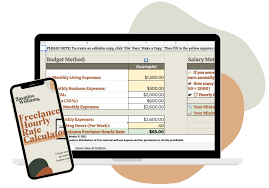
Feeling lost trying to figure out how much to charge for your freelance work? You’re not alone. So many talented freelancers struggle with this.
It’s a tough spot to be in. You want to be paid fairly. You also want to land clients.
This guide will help you find that sweet spot. We’ll break down how to set your rates. You’ll learn to feel confident about your pricing.
Use a freelance rate calculator to find your best hourly, daily, or project price. This helps ensure you earn enough to cover costs, pay yourself well, and still attract clients. It’s about valuing your skills and time properly.
What Is a Freelance Rate Calculator?
A freelance rate calculator is a tool. It helps you figure out what to charge. You put in some numbers.
It gives you a suggested rate. Think of it like a guide for your pricing. It doesn’t just guess.
It uses math to help you. It looks at your expenses. It also looks at how much you want to earn.
This calculator considers many things. It looks at your living costs. It thinks about your business costs.
This includes things like software or office supplies. It also factors in taxes. You have to pay taxes on your income.
The calculator helps you set a rate. This rate should cover all these costs. It also helps you make a profit.
The main goal is to find a fair price. A price that works for you and your clients. It stops you from undercharging.
It also stops you from overcharging. It takes the guesswork out of pricing. This makes it easier to start charging what you’re worth.
It builds confidence in your business.
Why Setting the Right Rate Matters
Getting your freelance rates right is super important. It affects your whole business. If you charge too little, you won’t make enough money.
You might even lose money. This can lead to stress and burnout. You might have to work too many hours.
You might have to say no to things you like.
On the other hand, if you charge too much, clients might not hire you. They might go with someone cheaper. This means you get fewer projects.
Less work means less income. It’s a hard balance to strike. You want to be competitive.
But you also need to be sustainable.
Good pricing shows you value your work. It tells clients you are a professional. It helps you attract the right kind of clients.
These are clients who respect your skills. They are willing to pay for quality. This leads to better projects.
It leads to happier clients.
Plus, your rates affect your future. Higher rates can lead to a better lifestyle. They can help you save money.
They can help you invest in your business. They can help you take time off. Proper rates are key to a thriving freelance career.
They help you grow and succeed over time.
How a Calculator Helps You Price Smart
A good calculator is more than just a number generator. It educates you. It shows you the different parts of pricing.
You learn what goes into setting a rate. You understand your own costs better. You see how much you truly need to earn.
It helps you look at the big picture. Freelancing isn’t just about the hours you work. It’s about running a business.
This includes marketing, admin, and learning new skills. Your rate needs to cover this too. The calculator helps you include these hidden costs.
It makes sure you don’t miss anything important.
Using one also makes you feel more secure. When you have a number based on data, you feel more confident. You can tell clients your rate.
You can explain why it’s fair. This is much better than guessing. You’re not just pulling a number out of thin air.
You’re using a structured method.
This tool also helps you grow. As your skills get better, you can raise your rates. The calculator can show you when this makes sense.
It helps you track your income goals. It becomes a partner in your business growth. It supports your journey as a freelancer.
Understanding Your Core Costs
Before you even think about a calculator, you need to know your numbers. This is the first step to smart pricing. We need to look at your personal costs.
How much do you need to live on each month? Think about rent or mortgage. Include food, utilities, and transportation.
Don’t forget fun stuff too! You need to live, not just survive.
Next, look at your business costs. What do you spend money on for your work? This might be software subscriptions.
It could be a website or online tools. You might need a new computer or camera. Think about office supplies too.
Even small things add up. Track these costs for a few months.
Taxes are a big one. As a freelancer, you’re self-employed. You have to set aside money for taxes.
This can be a large chunk of your income. Many experts suggest saving 25-30% for taxes. Your calculator should help you factor this in.
It’s better to be over-prepared than under-prepared.
Finally, consider your desired profit. You’re running a business. You want to make more than you spend.
This profit can be reinvested. It can be saved for future goals. It can provide a cushion for slow months.
Knowing these core costs is the foundation of your pricing.
Essential Cost Breakdown for Freelancers
- Personal Living Expenses: Rent/Mortgage, Food, Utilities, Transportation, Health Insurance, Entertainment.
- Business Operating Costs: Software, Tools, Hardware, Office Supplies, Website Hosting, Marketing, Professional Development.
- Taxes: Estimate federal, state, and local taxes. Aim to set aside 25-30% of your income.
- Profit Margin: The amount you want to earn above your costs to reinvest or save.
Calculating Your Target Income
Once you know your costs, you can set a target. How much do you want to earn in a year? This is your annual income goal.
It should cover all your personal expenses. It should also cover your business expenses. And it should include your desired profit.
And don’t forget those taxes!
Let’s say you want to earn $60,000 a year. This is your take-home pay goal. You also have $10,000 in business expenses.
And you need to save $15,000 for taxes. Plus, you want to put aside $5,000 as profit for growth. Your total annual income need is $60,000 + $10,000 + $15,000 + $5,000 = $90,000.
This $90,000 is your target gross income. This is the amount you need to bill clients. It’s important to aim high.
You won’t always be billing clients. There will be slow periods. There will be time spent on non-billable tasks.
So, aiming for a higher gross income helps.
This target income is a crucial number. It’s the foundation for calculating your hourly rate. It helps you see the bigger financial picture.
It moves you from just doing work to building a sustainable career. It makes your freelance goals concrete.
Figuring Out Your Billable Hours
This is where many freelancers get tripped up. You don’t get paid for every single hour you work. You only get paid for the time you spend on client projects.
This is called billable time. How many hours can you realistically bill each week?
Think about a standard work week. That’s 40 hours. But you don’t spend all 40 hours on client work.
You have to do admin tasks. You need to reply to emails. You might need to find new clients.
You have to manage your finances. You might need to learn new skills or take training.
Let’s be realistic. A good estimate for billable hours is often around 20-30 hours per week. Some might do a bit more.
Some might do less. It depends on your field and your efficiency. This number is key.
It’s the divisor in your hourly rate calculation.
If you aim to bill 25 hours per week, that’s 25 hours * 50 weeks per year = 1250 billable hours per year. We use 50 weeks to account for vacation and holidays. This number is vital.
It translates your annual income goal into an hourly rate.
It’s a good idea to track your time. For a week or two, log everything you do. See how much time is spent on client work versus other tasks.
This will give you a more accurate number for your own situation. This self-awareness helps set a rate you can actually achieve.
Estimate Your Billable Hours Per Week
Total Work Hours in a Week: 40 hours (example)
Non-Billable Tasks:
- Admin (emails, invoicing): 3-5 hours
- Marketing & Sales: 3-5 hours
- Learning & Training: 2-3 hours
- Networking: 1-2 hours
Estimated Billable Hours: 25-30 hours per week (example)
Important: Track your own time to find your real numbers!
Calculating Your Hourly Rate
Now we put it all together. The formula is simple. Your Target Hourly Rate = Total Annual Income Needed / Total Annual Billable Hours.
Let’s use our previous example. Your total annual income needed was $90,000. You estimated 1250 billable hours per year.
So, $90,000 / 1250 hours = $72 per hour. This is your target hourly rate.
This number might seem high or low at first. But remember what it includes. It covers your living costs.
It covers your business costs. It covers taxes. It includes profit.
It’s a rate that sustains your business and your life.
Many freelancers start with a lower rate. They do this to get clients. But over time, you should aim to increase it.
As you gain experience, your value increases. Your skills become more refined. You deliver better results for clients.
This justifies a higher rate.
Don’t be afraid to use a calculator. They do this math for you. You just input your numbers.
They show you the result. This makes the process less intimidating. It provides a solid starting point for your pricing discussions.
Hourly Rate Calculation Example
- Desired Annual Take-Home Pay: $60,000
- Annual Business Expenses: $10,000
- Annual Tax Savings (approx. 25%): $15,000
- Annual Profit Goal: $5,000
- Total Annual Income Needed: $90,000
- Estimated Annual Billable Hours (25 hrs/wk * 50 wks): 1250 hours
- Calculated Hourly Rate: $90,000 / 1250 = $72/hour
Daily and Project Rate Considerations
Not all freelance work is billed by the hour. Some clients prefer daily rates. Others want a fixed price for a whole project.
You need to know how to calculate these too.
Daily Rate: This is usually based on your hourly rate. A typical workday is 7-8 hours. So, your daily rate might be your hourly rate multiplied by 8.
If your hourly rate is $72, your daily rate could be $72 * 8 = $576.
However, be careful. If a client asks for a day rate, they might expect you to be available for a full 8 hours. Make sure this is covered by your hourly calculation.
Some freelancers add a small buffer. This accounts for the potential for longer days or fewer billable hours within that day.
Project Rate: This is the trickiest. It’s a fixed price for a defined scope of work. You need to estimate the time the project will take.
Then, multiply that by your hourly rate. Add a buffer for unexpected issues or scope creep.
For example, if you estimate a project will take 20 hours, and your hourly rate is $72, that’s $1440. You might add a 20% buffer for unknowns. So, $1440 * 1.20 = $1728.
You could then round this to $1750 or $1800.
Project rates are great for clients. They know the exact cost upfront. For you, they carry risk.
If the project takes longer than expected, you earn less per hour. Always define the project scope clearly. Have a clear process for handling changes.
Converting Hourly to Other Rates
- Hourly Rate: $72 (example)
- Daily Rate (8-hour day): $72 * 8 = $576
- Project Rate (Estimate time, multiply by hourly, add buffer):
- – Project estimated at 20 hours.
- – Base project cost: 20 hours * $72/hour = $1440
- – Add 20% buffer for unknowns: $1440 * 1.20 = $1728
- – Rounded Project Rate: $1750 – $1800
Factors That Influence Your Rates
Your calculated rate is a starting point. Many other things can affect what you actually charge. Experience is a big one.
Newer freelancers might charge less. Seasoned experts can command higher rates.
Your skills and niche also matter. If you have specialized skills. Or if you work in a high-demand niche.
You can often charge more. Think about web development versus data entry. Web development skills are generally more valuable.
The complexity of the project plays a role. A simple task might warrant a lower rate. A complex, strategic project requires more expertise and time.
This should be reflected in the price. You need to charge for the value you provide.
Your location can be a factor too. Cost of living varies. Some clients might expect lower rates if you’re in a lower cost of living area.
But if your clients are global, this might not apply. Focus on your value, not just your postcode.
Demand for your services is also key. If you’re in high demand, you have more leverage. You can afford to be selective.
You can charge premium prices. If demand is low, you might need to be more flexible.
Finally, your reputation and portfolio matter. A strong portfolio shows past success. Testimonials from happy clients build trust.
This all adds to your perceived value. It allows you to charge more.
Key Factors Affecting Freelance Rates
- Experience Level: Junior vs. Senior expertise.
- Skills & Niche: Specialized or in-demand skills.
- Project Complexity: Simple tasks vs. intricate strategies.
- Location/Client Location: Cost of living considerations.
- Market Demand: High demand allows for higher pricing.
- Reputation & Portfolio: Demonstrated success and client trust.
- Value Provided: The impact and ROI for the client.
My Own Pricing Journey
When I first started freelancing, I was terrified of setting my rates. I remember looking at other people’s websites. They all had different prices.
Some seemed incredibly high. Others felt too low to be real. I felt completely out of my depth.
My first few clients were friends or people who found me through a low-cost job board. I charged them peanuts. I was so happy to have work.
I didn’t realize I was devaluing myself. I thought, “Just get some experience.” But experience alone doesn’t pay the bills.
One day, I was working late, staring at my invoices. I realized I was barely making enough to cover my rent. I was exhausted.
I felt like I was running on a hamster wheel. This was not the freedom I signed up for. It was just a different kind of stressful job.
That’s when I decided to get serious about pricing. I found an online calculator. I plugged in my living expenses, my tiny business costs, and the meager amount I wanted to save.
The number it spat out was much higher than what I was charging. It felt impossible.
I took a deep breath. I decided to make a change. I started with my next new client.
I quoted them my calculated rate. My heart was pounding. I waited for the rejection.
But guess what? They accepted! They said my quote was fair.
That was a huge moment for me. It was the first time I felt truly valued.
It wasn’t instant success. There were still clients who said no. But the clients who said yes were better.
They respected my work. They paid on time. They gave me great feedback.
It made a massive difference to my confidence and my business. Learning to price myself was the best thing I ever did.
Common Mistakes Freelancers Make with Rates
Many new freelancers fall into similar traps. One of the biggest is not accounting for taxes. You might think you earn $50 an hour.
But if 30% goes to taxes, your actual take-home is much less. Always factor in Uncle Sam!
Another mistake is not tracking business expenses. You might have software subscriptions. Or maybe you pay for online courses.
These are costs of doing business. If you don’t include them in your rate, you’re paying for them out of your pocket. This eats into your profit.
Forgetting to include a profit margin is also common. You need to make more than you spend. This profit is for growth.
It’s for buying better tools. It’s for saving for retirement. It’s for expanding your services.
Without profit, your business stagnates.
Underestimating your billable hours is another pitfall. You might think you can bill 40 hours a week. But reality hits when you’re doing marketing, admin, and client calls.
Be realistic about how much time you can actually charge for.
Finally, not raising your rates over time is a big mistake. Your skills improve. Your experience grows.
The market changes. If you keep charging the same rate for years, you’re leaving money on the table. Periodically review and adjust your rates.
Freelancer Pricing Pitfalls to Avoid
- Ignoring Taxes: Not setting aside enough for government dues.
- Forgetting Business Expenses: Not covering software, tools, or marketing costs.
- No Profit Margin: Only covering costs without earning extra for growth.
- Unrealistic Billable Hours: Overestimating the hours you can actually charge for.
- Stagnant Rates: Never increasing prices despite growing skills and experience.
- Underselling Value: Charging too little because of self-doubt or fear.
When to Use a Calculator vs. Manual Calculation
A calculator is a fantastic tool. It’s especially good when you’re starting out. It helps you understand the components of pricing.
It gives you a solid, data-driven number. It removes the emotional guesswork.
If you’re new to freelancing, use a calculator first. It will guide you through the steps. It makes sure you don’t miss anything crucial.
It’s like having a seasoned advisor helping you.
As you become more experienced, you might not need a calculator every time. You’ll develop an intuition for pricing. You’ll know your costs and your market well.
You might do a quick manual calculation. Or you might adjust your rates based on your experience and demand.
However, even experienced freelancers can benefit from a calculator. Use it as a check. Revisit your rates every year or two.
Plug your updated numbers into a calculator. See if your current rates still align with your goals and costs. It’s a good way to stay on track.
Ultimately, the goal is to feel confident. Whether you use a calculator or do it manually, the process should make sense to you. It should be based on your reality.
Your pricing should support your business and your life.
Finding the Best Freelance Rate Calculators
There are many great calculators online. They range from simple to quite detailed. Some are free.
Others might be part of a larger freelance platform or course.
When choosing one, look for these features:
- Clear Input Fields: It should be easy to enter your expenses, desired income, and billable hours.
- Explanation of Factors: Good calculators explain why they ask for certain information.
- Customization: Can you adjust variables like tax rates or profit margins?
- Rate Types: Does it calculate hourly, daily, and project rates?
- Reputable Source: Is it from a trusted freelance resource or organization?
Some popular online resources offer calculators. Look for sites that focus on freelance business advice. You can often find them by searching terms like “freelance hourly rate calculator” or “freelancer pricing tool.”
Try out a few different ones. Compare the results. See which one resonates most with your understanding.
The best calculator is the one that helps you feel most informed and confident about your pricing decisions. It’s a tool to empower your business.
Hourly vs. Daily vs. Project Rates: Which is Best?
The “best” rate structure depends on your field and your client. Hourly rates are good for tasks where the scope might change. Or for ongoing work where hours can vary.
They are straightforward to track.
Daily rates are often used for services where you’re dedicated for a set period. Think of consulting or on-site work. They provide a clear daily income figure.
This can simplify budgeting for some clients.
Project rates offer predictability for clients. They know the total cost upfront. This can be great for well-defined projects like website design or a specific marketing campaign.
For the freelancer, it requires accurate time estimation and risk management.
Some freelancers use a mix. They might charge hourly for smaller, ongoing tasks. They might offer project rates for larger, defined projects.
They might use a daily rate for specific workshops or training sessions.
Consider what your clients prefer. What is standard in your industry? What feels most comfortable and profitable for you?
Don’t be afraid to offer options. Let clients choose what works best for them, while still ensuring you are compensated fairly.
Choosing the Right Rate Structure
| Rate Type | Best For | Pros | Cons |
|---|---|---|---|
| Hourly | Ongoing work, variable scope, consulting | Simple tracking, fair for changing needs | Client may worry about time spent, less predictable income for freelancer |
| Daily | Dedicated days of work, consulting, workshops | Clear daily earnings, good for time-bound tasks | Requires estimating full day’s work, may miss out if finished early |
| Project | Well-defined deliverables, fixed-scope projects | Client certainty on cost, potential for higher profit if efficient | Risk of underestimating time, scope creep can cause losses |
What This Means For You
Understanding how to calculate your rates is empowering. It means you can stop guessing. You can start pricing with confidence.
This affects your business in many ways.
It means you can cover your bills. You can save for your future. You can invest in your business.
You can take time off without financial stress. It allows for a sustainable freelance career.
It also means you attract better clients. Clients who value your expertise are willing to pay for it. They become better partners.
This leads to more fulfilling work. It reduces stress and frustration.
Knowing your rates helps you say no. You can decline projects that don’t align with your goals or pay too little. This frees you up for projects that are a better fit.
It helps you build the business you truly want.
Ultimately, it means you are in control. You are not a victim of low-paying clients. You are a professional running a business.
Your rates reflect your value and your worth. This is a powerful shift.
When Your Calculated Rate Feels Too High
It’s completely normal to look at a calculated rate and feel a pang of fear. “How can I possibly charge that much?” This feeling often comes from comparing yourself to others or from years of undercharging.
First, remember what went into that number. It’s not just an arbitrary figure. It’s your living expenses, business costs, taxes, and profit.
It’s what you need to earn to be sustainable.
If the number feels too high, revisit your assumptions. Are your expense estimates accurate? Are you being realistic about billable hours?
Did you factor in enough for taxes and profit?
Consider your experience level. If you’re just starting, your calculated rate might be your target for a year or two down the line. You can begin with a slightly lower rate, but have a clear plan to increase it.
For example, you might start at 80% of your calculated rate and commit to increasing it by 10% every few months.
Also, think about the value you provide. Are you solving a significant problem for your clients? Are you saving them time or money?
Are you helping them grow their business? High rates are justified when the ROI for the client is substantial. Focus on communicating that value.
Don’t be afraid to experiment. You can test your rates. If a client pushes back, you can discuss their budget.
Sometimes, you can adjust the scope to fit their budget. But always protect your core needs.
When Your Calculated Rate Feels Too Low
On the flip side, sometimes your calculated rate might feel surprisingly low. This could happen if your expenses are minimal or if you’re working in a field with very low overhead.
If this is the case, don’t be afraid to charge more! Your calculated rate is a minimum baseline. It’s what you need.
You can always charge more if you believe your skills and the value you provide warrant it.
Consider raising your rates proactively. Don’t wait for clients to ask for it. As you gain more experience, take on more complex projects, or develop specialized expertise, your value increases.
This is a good time to adjust your pricing upwards.
Look at what others in your niche are charging. Are you significantly below the market rate? If so, it might indicate you’re undervaluing yourself.
You can slowly increase your rates for new clients.
Remember that your rate impacts how clients perceive you. A very low rate might signal a lack of experience or quality. A higher, well-justified rate can signal confidence and expertise.
Aim for a rate that reflects the true value you deliver.
Quick Tips for Setting Your Rates
Here are some final, actionable tips for setting your freelance rates:
- Track Everything: Log your time, expenses, and income diligently.
- Know Your Numbers: Understand your personal and business costs.
- Use a Calculator: Let tools help you with the math, especially at first.
- Don’t Undersell: Value your skills and the problems you solve.
- Be Clear: State your rates upfront and avoid surprises.
- Review Regularly: Adjust your rates as you gain experience and market demand shifts.
- Communicate Value: Explain why your rates are fair and what clients receive.
- Offer Options: Consider hourly, daily, and project rates.
- Build a Buffer: Always account for taxes, expenses, and profit.
- Trust Your Gut: If a rate feels wrong, it probably is.
Frequently Asked Questions About Freelance Rates
How often should I review and potentially increase my freelance rates?
It’s a good idea to review your rates at least once a year. More often, perhaps every six months, is even better if you’re seeing significant growth in your skills, portfolio, or client demand. Think about when you’ve acquired new valuable skills or when your cost of living has increased.
What if a client tries to negotiate my rates down significantly?
If a client tries to negotiate, first understand their budget and why they’re pushing back. Sometimes, you can adjust the scope of work to fit their budget. If they still want your full service at a much lower price, it might be a sign they’re not the right fit for you.
It’s okay to politely decline or to walk away if the rate doesn’t meet your minimum needs.
Should I charge less for clients I’ve worked with before?
Generally, no. While loyalty is appreciated, your rates should reflect your current value and costs, not just past relationships. You can offer loyalty discounts on larger projects or as a bonus for significant contracts, but your core hourly or project rate should remain consistent to reflect your worth.
Changing rates for long-term clients can also create confusion.
How do I handle unexpected extra work on a project priced at a fixed rate?
This is why defining the scope of work clearly and including a buffer in your project rate is crucial. If unexpected extra work arises that goes beyond the agreed-upon scope, you should discuss it with the client. You can present this as a change order, explaining the additional time and cost involved.
This ensures you are compensated fairly for the extra effort.
Is it ever okay to charge for “discovery” or “consultation” calls?
Yes, especially for longer or more complex projects. Initial calls to understand a client’s needs can take significant time and expertise. For brief introductory calls, many freelancers offer them for free.
For more in-depth consultations or discovery sessions that will involve significant brainstorming or strategy development, it’s perfectly acceptable to charge an hourly or flat fee.
What is the difference between a freelance rate calculator and an invoice generator?
A freelance rate calculator helps you determine how much to charge for your services. It uses your costs, desired income, and billable hours to suggest a price. An invoice generator is a tool to create professional invoices to send to clients after you’ve agreed on a price.
It helps you track payments and manage billing.
Conclusion
Setting your freelance rates doesn’t have to be a mystery. By understanding your costs, estimating your billable hours, and using tools like calculators, you can arrive at a price that works. It’s about valuing your time and expertise.
It’s about building a sustainable and rewarding freelance career. Start using a calculator today and gain confidence in your pricing!